
Sessions and account security
Your account
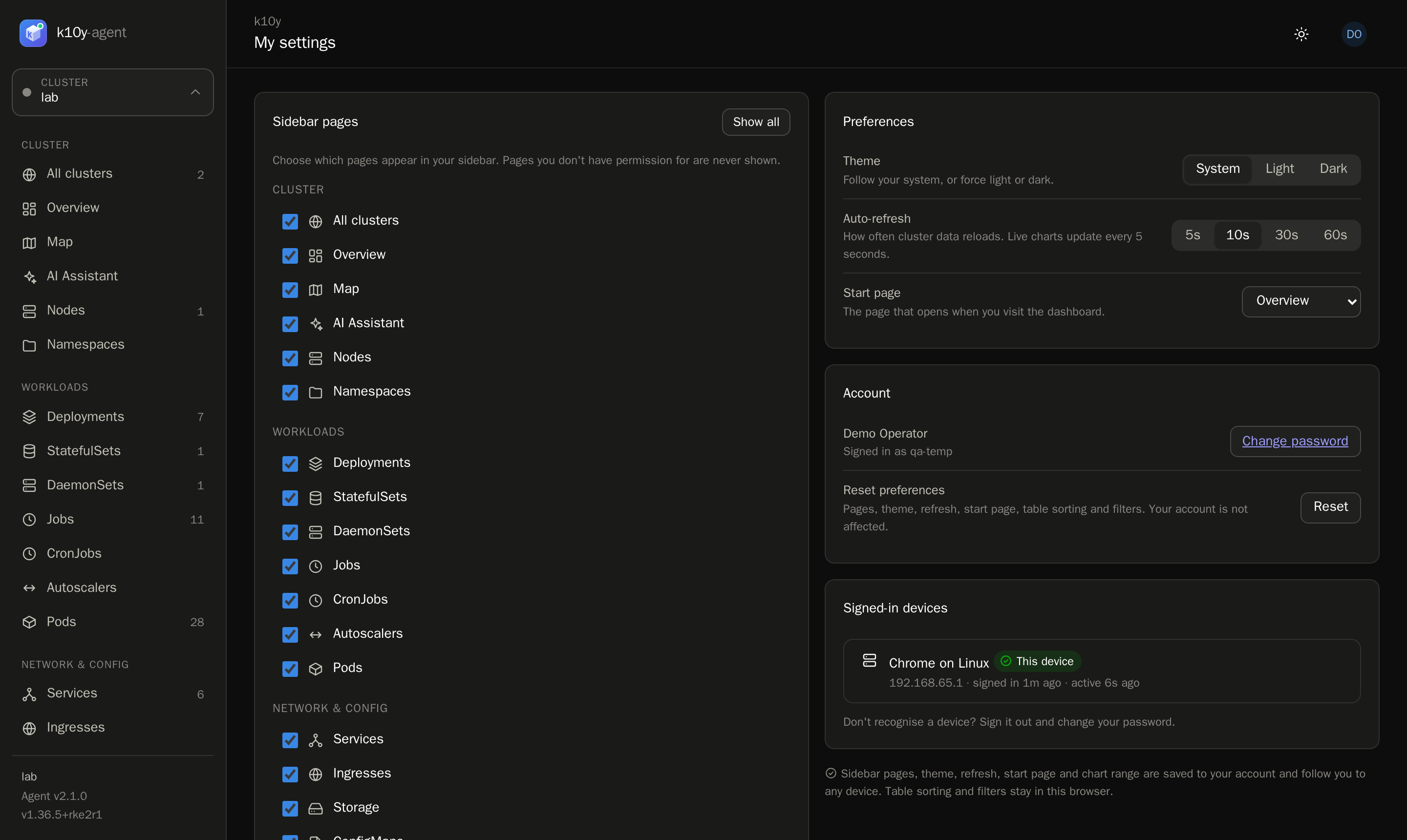
My settings (bottom of the sidebar) is personal:
- Sidebar pages: hide pages you don't use. You never see pages you lack permission for.
- Theme, auto-refresh interval and start page.
- Change password.
- Signed-in devices: every browser where you're signed in, with its IP address, when it signed in and when it was last active. Sign out one device, or Sign out all others.
Sidebar pages, theme, refresh, start page and chart range are saved to your account, so they follow you to every device. Table sorting and filters stay in each browser.
Passwords
- At least 8 characters, with letters plus numbers or symbols. The change-password page shows a strength meter and the rules as you type.
- Changing your password signs out every other session.
- After 5 failed sign-ins in 5 minutes for the same username and IP, sign-in pauses for a few minutes.
For admins
On Administration → Users you see each user's last activity and number of active sessions:
- Sign out ends every session of that user.
- Disable blocks the account and ends its sessions at once. Enable restores it.
- Opening a user shows their signed-in devices.
Sessions
Sessions last 12 hours of inactivity (set K10Y_SESSION_HOURS to change it) and extend while you use k10y. The browser cookie is HttpOnly, Secure and SameSite=Strict, and the server only stores a hash of it.