
Edit YAML
Change any object's YAML right in its details panel, like kubectl edit. You need the resources.edit permission on the cluster and control enabled on its agent. Admin always has it. On hubs installed with 2.1 or later, the built-in Operator role has it too; on older hubs, add it to the roles that need it.
Steps
- Open the object, for example a ConfigMap or Deployment, and choose the YAML tab.
- Click Edit. Change the YAML. Tab inserts two spaces.
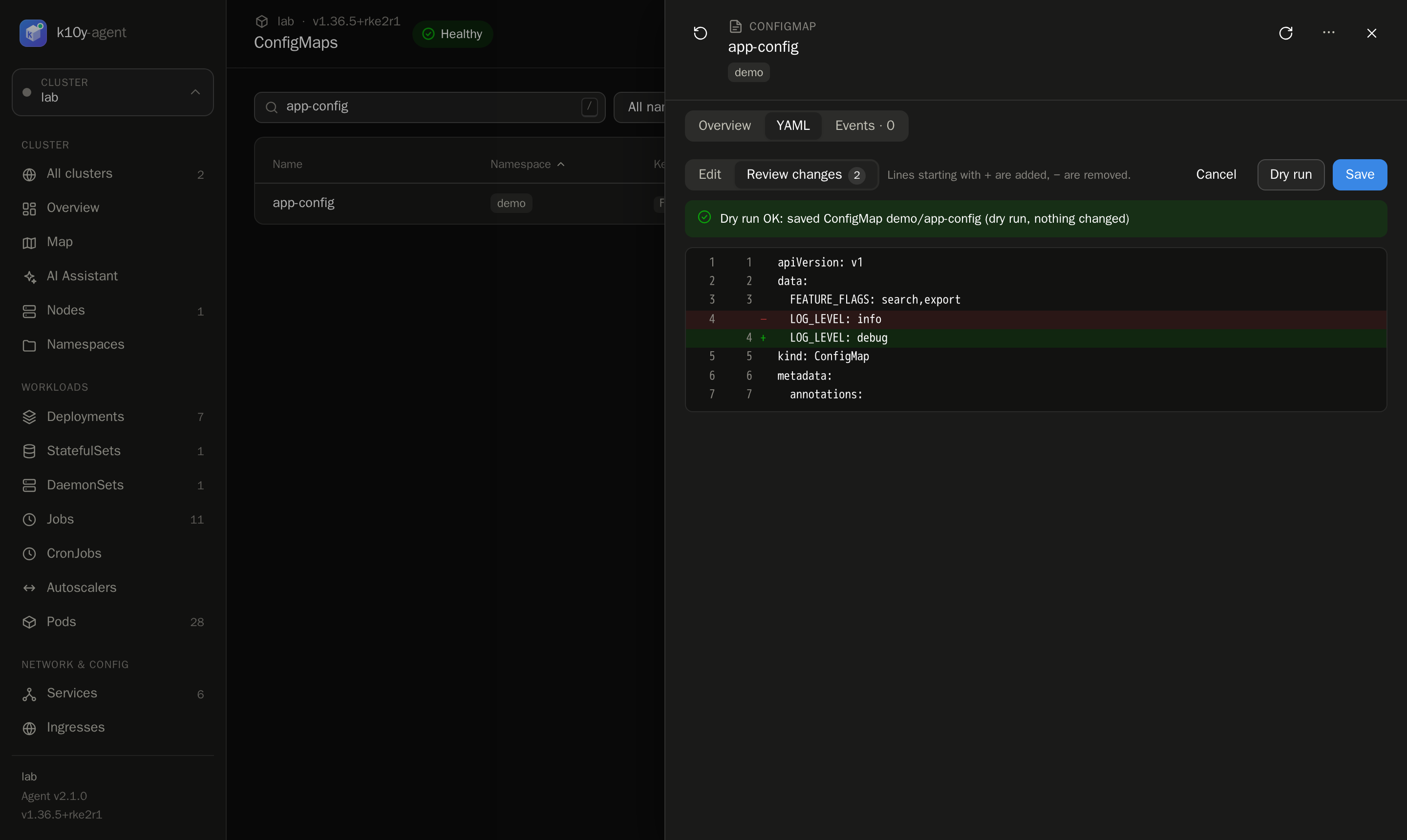
- Click Review (or press Ctrl/⌘+Enter). You'll see exactly what changes: removed lines in red, added lines in green.
- Click Dry run to let Kubernetes validate the change without applying it.
- Click Save.
Good to know
- Conflicts are caught. The YAML includes the object's
resourceVersion. If someone else changed the object after you opened it, saving fails with a clear message instead of overwriting their change. Reload and edit again. - Kind, name and namespace can't change. To create a new object, use Apply YAML.
- Secrets can't be edited here, because their values are never sent to the browser.
- Protected namespaces (
kube-system,k10y) are read-only. - Status fields are ignored: only the spec and metadata you change are saved.
- Every save and dry run is in the audit log as
edit, with the object's name.